
What is Type Garden?
Type Garden Vercel app is an interactive typography project at type-garden.vercel.app. Letters become a setting for growing stems, leaves and flowers, with keyboard actions shaping the composition. A second workspace turns a word or short phrase into a square animated poster. AINavly covers it as a small Vercel-hosted creative experiment: a way to explore the relationship between text, generative ornament and motion rather than a conventional document editor or typing-speed test.
What you can do
- Type mode with growing botanical ornament around letters
- Space, Backspace and Enter mapped to cut, wither and clear
- 10 named color palettes, including Paper and Rose noir
- Poster workspace with a word field and Regrow garden
- Seven labeled motion presets with different loop lengths
- PNG and SVG controls in Type mode
- 1080 × 1080 loop export controls in Poster mode
How to get started
- Open type-garden.vercel.app in a browser with JavaScript enabled.
- Start in Type mode and enter a few letters to see stems appear.
- Choose a palette such as Paper so the text and botanical shapes are easy to compare.
- Switch to Poster for a dedicated word field and square composition.
- Enter a short sample such as Grow, then choose Regrow garden.
- Compare a motion preset and check its displayed loop duration.
- Choose the export control for the current mode only after inspecting the result; this guide did not verify downloaded files.
Where can I find the Type Garden Vercel app?
The project covered here is https://type-garden.vercel.app/ and displays the name Type Garden. Its interface credits Akshat Agarwal and links to the creator’s public profile. The exact hostname distinguishes it from similarly named typing or gardening projects. A JavaScript-free page fetch exposes little beyond a loading message, while a browser loads the interactive workspace. This guide is based on that rendered interface and a small hands-on composition, not an assumed feature list inferred from the project name.
What happens when you type?
The Type workspace pairs large lettering with growing stems and flowers. Its on-screen instructions map typing to growth, Space to cutting, Backspace to withering and Enter to clearing. Those keys are creative controls, so editing does not follow the same visual model as a word processor. Try a few letters first and watch the relationship between the characters and surrounding shapes. We saw letters and stems appear during a short sample; we did not systematically test every key mapping, writing system, emoji or input method.
How does Poster mode work?
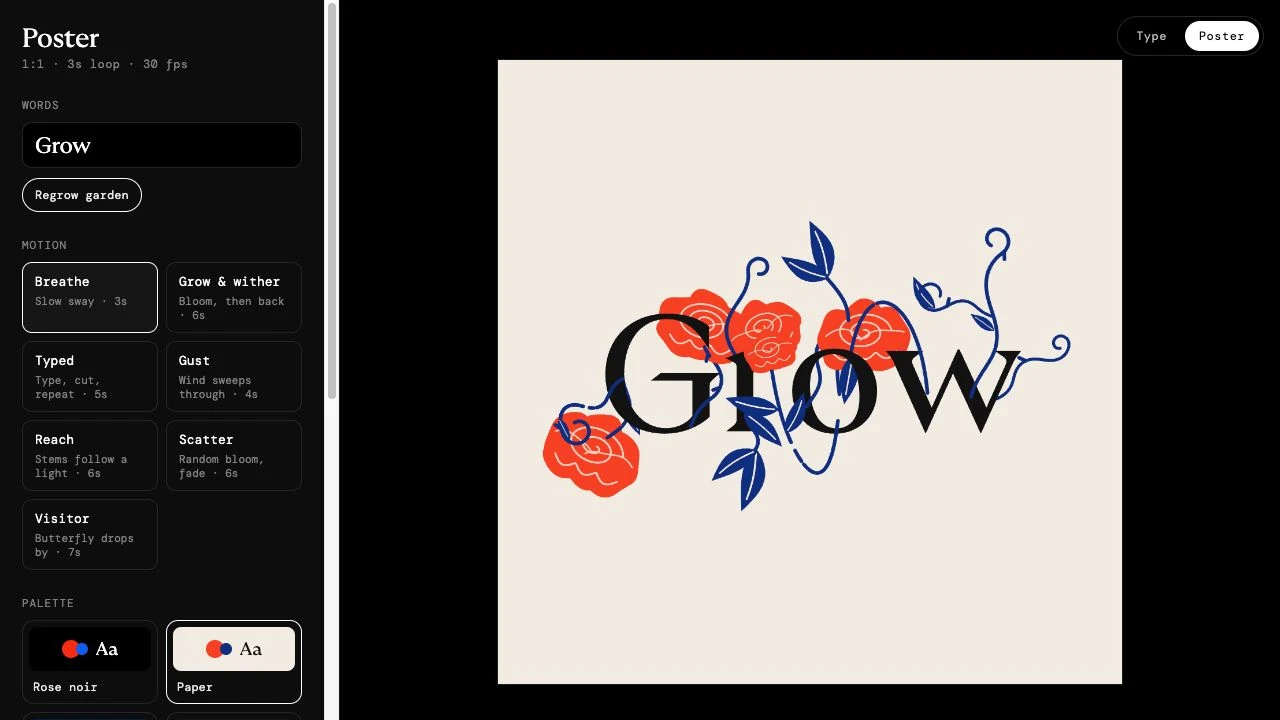
Poster presents a square canvas alongside a word field, a Regrow garden button, motion choices and palettes. We entered Grow in the word field, selected Paper and used Regrow garden. The preview showed the word surrounded by red flowers and blue stems on a light background. This is the composition captured in our screenshot. A short word makes it easier to judge whether the ornament supports the letterforms or obscures them. We did not test long paragraphs, print layouts, multi-page designs or a persistent project library.
Which palettes and motion presets are available?
The inspected palette list contained Rose noir, Paper, Midnight, Citrus, Orchid, Moss, Tomato, Butter, Blush and Mono. Poster also displayed Breathe, Grow & wither, Typed, Gust, Reach, Scatter and Visitor. Their labels describe different effects, and the displayed loop lengths vary: Breathe showed three seconds, while Visitor showed seven. The panel also indicated 30 fps. These are interface settings, not a benchmark of rendering performance or proof that every exported clip matches its label. Change one setting at a time when comparing compositions.
What is the difference between PNG, SVG and Poster exports?
Type mode exposes PNG and SVG controls for still-image output. Poster instead presents an MP4 loop control and a PNG-frames ZIP option, labeled for 1080 × 1080 output. Choose the format based on the destination: a still composition and an animated sequence solve different needs. We inspected these controls but did not download files, verify SVG structure, inspect video encoding or compare frame timing. Treat the displayed size and formats as the project’s offered options rather than our verification of a finished export. Keep important text separately before reloading.
Why might Type Garden stay on Unpacking or show a blank screen?
The delivered page says JavaScript is required and includes an Unpacking loading state. That explains why a text-only preview can appear empty even when the browser application is available. First check the complete URL and allow the page to initialize in a current browser. If the workspace appears but typing does nothing, activate the Type canvas or use Poster’s explicit word field to separate a focus problem from a loading problem. We did not test every browser or mobile keyboard, and a loading screen alone does not identify the cause of a failure.
Is it free, and what does Copy code do?
No account or payment gate appeared in the typing and Poster editing steps we checked. The interface includes an optional creator-support link and a Copy code control whose tooltip describes copying source with a brief for further customization. We did not activate that control, inspect the copied package or verify reuse terms. Its presence should not be treated as a verified open-source license or a promise of a hosted customization service. We also did not establish a complete pricing policy, long-term project storage or privacy protections from the absence of a login screen.
How does Type Garden fit among creative Vercel projects?
The distinctive idea is to make typography an evolving composition: keyboard actions influence organic ornament, while Poster turns that experiment into a short visual loop. Stitch Typewriter is a useful comparison for embroidery-style lettering and motifs. DigiBouquet centers on arranging a digital flower gift with a card, while Gacha Message emphasizes the recipient’s capsule reveal. Type Garden is the more direct fit when the letters and their surrounding motion are the artwork. The Vercel address is the discovery context; the creative interaction is the reason to explore it.
Who it suits
People exploring generative typography, short visual loops and playful text-based art.
Before you start
Enter clears the Type composition according to the interface. Keep important text separately, and inspect downloaded output before using it in a finished design.
Common questions
What is the Type Garden Vercel app website?
The inspected project is https://type-garden.vercel.app/. It displays Type Garden and credits Akshat Agarwal.
Is Type Garden a typing-speed test?
The inspected interface creates botanical typography and posters. We did not find words-per-minute scoring or a timed typing test in the checked workspace.
What do Space, Backspace and Enter do?
The on-screen Type instructions describe Space as cutting, Backspace as withering and Enter as clearing. These are creative actions rather than ordinary document-editing labels.
Can I create an animated poster?
Poster mode offers a word field, Regrow garden and seven motion presets. We generated a Grow preview, but did not verify an exported animation.
Can Type Garden export PNG or SVG?
Type mode displays PNG and SVG controls. Poster separately offers MP4 loops and a ZIP of PNG frames. Successful downloads and output compatibility were not tested.
What size are the Poster exports?
The inspected export section was labeled 1080 × 1080 loop. Its panel showed 30 fps and loop duration varied by motion preset; exported dimensions and timing were not independently verified.
Why does it say JavaScript is required or Unpacking?
The application needs JavaScript to display its interactive workspace. We reached the editor in a browser even though the initial text-only response contained a loading state.
Does it require an account or payment?
No login or payment appeared during our typing and Poster preview check. We did not verify a complete pricing policy or every export action.
Sources and review scope
Checked October 18, 2026: loaded the rendered application, entered a short Type-mode sample, changed to Paper, switched to Poster, set the word to Grow and used Regrow garden. Inspected palette names, motion labels and the two modes’ export controls, then returned to Type. No download, copied-code package, account, payment, reload persistence, mobile input or exhaustive key-mapping test was performed.