
What is Gacha Message?
Gacha Message is a compact Vercel-hosted project that turns the delivery of a note into an interaction. A sender builds a tiny message machine, names it and fills capsules with short text. A recipient sees the machine rather than a conventional chat thread. For AINavly’s Vercel project discovery, the interesting part is the transition from a text editor to a playful reveal: the same small set of notes becomes an object someone can open.
What you can do
- Up to 10 capsule messages
- 320-character counter for each message
- Custom machine title
- Turn-handle and open-capsule preview
- Copy link sharing control
How to get started
- Visit the project and follow Make your own gacha.
- Inspect the title field and the three starter capsule messages.
- Replace the examples with a few short, non-sensitive notes.
- Use Add message to expand the set within the 10-note limit.
- Open Preview, turn the handle and then choose Open capsule once it appears.
- Use Back to compare the editor with its recipient presentation before deciding to copy a link.
What makes this Vercel project distinctive?
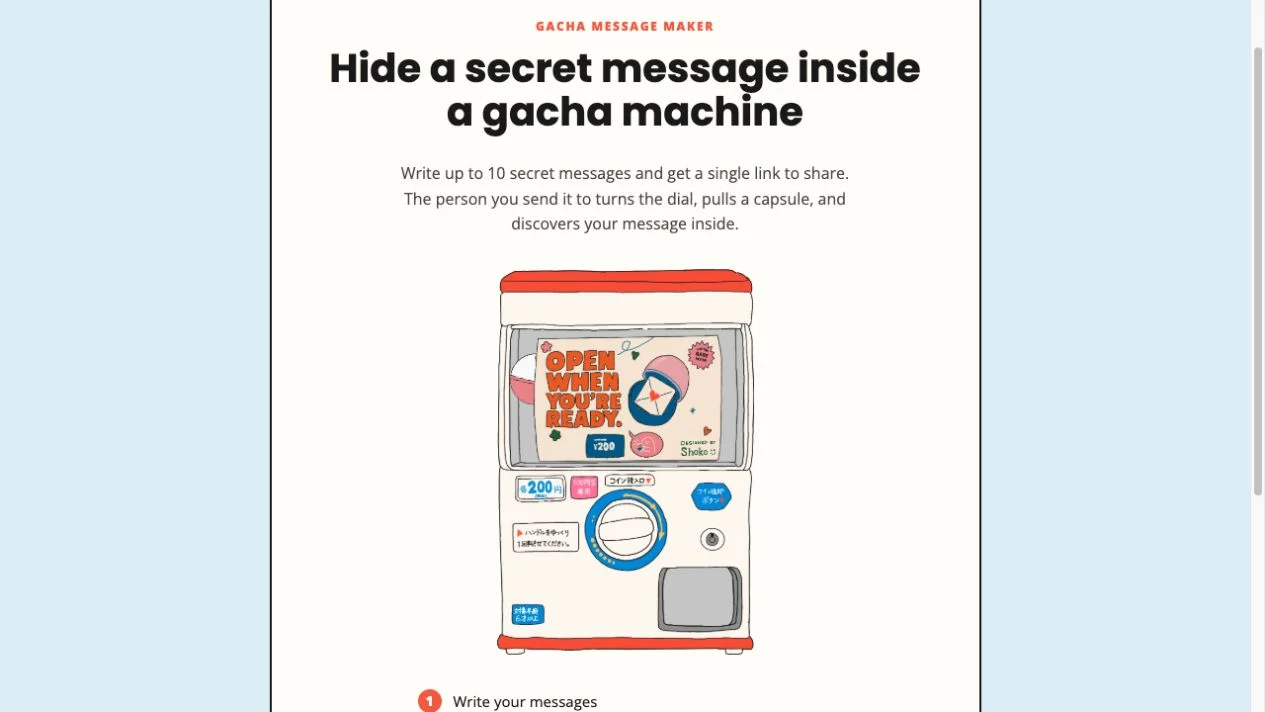
Searching for “gacha message vercel app” leads to a focused creative project at gacha-message.vercel.app. The page credits @shoko.oym and calls the product Gacha Message. Its central idea is presentation rather than an extensive editing toolkit: individual text entries become capsule surprises inside a hand-drawn machine. The illustration includes decorative price labels, but we encountered no checkout in the editor or preview. Artwork on a machine should not be mistaken for a verified service price.
How is the message editor structured?
Make your own gacha opens a setup screen titled Build a tiny message gacha. It contains a machine title and initially three capsule entries, each with its own text area and /320 counter. Add message is the next obvious way to grow the collection; the landing page specifies a ceiling of 10. There were no media-upload or audio-recording controls in the inspected setup. The project is therefore useful to examine as a bounded text-composition flow rather than assuming it supports every kind of multimedia greeting.
What changes when you select Preview?
Preview replaces the writing form with the illustrated machine and a prominent title. Turning the handle produces an animated capsule; opening the capsule then reveals the text in a separate modal. Our test used the project’s default content and displayed “Another capsule, another feeling.” Closing that modal restored the machine, and Back returned to editing. This makes it possible to inspect a real recipient-like reveal without publishing a message. We did not test the separate Copy link action.
Why are the messages better treated as independent pieces?
The capsule presentation encourages discovery one note at a time. Drafting each piece as a complete thought avoids making comprehension depend on the order in which capsules appear. We observed one reveal and did not measure the selection distribution, prove fairness or test how repeats behave in a shared session. For interaction design, the more defensible takeaway is the separation between composing a collection and revealing one item, not a claim about sophisticated randomization.
What does the Vercel hostname establish?
It gives this guide a precise project address and identifies the hosting context in which we found it. It does not, by itself, prove a particular framework, database, developer identity or privacy policy. The site metadata describes a no-account, link-based experience; the public editing and preview path we visited required no sign-in. We did not audit all infrastructure or third-party processing. Avoid extrapolating a small interface demonstration into a guarantee about tracking, storage, permanent access or secure communication.
What should you check before relying on a shared version?
Test with a light greeting and keep your draft separately. Confirm the title and every capsule, then inspect the intended recipient view before copying a link. We did not verify delivery, expiration, updating a previously shared machine, deletion or mobile compatibility. If you are comparing small Vercel projects, contrast this multi-note reveal with Canned Letter’s single-object opening or Bloomify’s bouquet arrangement. Those comparisons reveal different product decisions instead of treating every digital gift as the same workflow.
Who it suits
People making a light personal greeting, a set of encouragements or a playful digital gift.
Before you start
Use messages you are comfortable sharing by link. We did not verify private access, revocation, retention or delivery to another device.
Common questions
Where can I open gacha message vercel app?
The inspected deployment is https://gacha-message.vercel.app/ and displays the name Gacha Message.
Does the editor support photos or recordings?
We saw a title field and capsule text areas, with no photo or audio controls in the inspected setup.
What limits are visible?
The homepage says up to 10 messages, and each capsule text area shows a /320 character counter.
Can I inspect the reveal without sharing a link?
Yes. We entered Preview with the default messages, turned the handle and opened a capsule without using Copy link.
Is it a Next.js app?
We did not establish the project framework. A vercel.app hostname alone is not evidence of Next.js.
Is the machine’s printed price a checkout charge?
The illustration includes price-like labels, but no account or payment gate appeared in our editor and preview check. We did not verify a complete pricing policy.
Sources and review scope
Checked October 18, 2026: inspected the homepage and editor with three default messages, entered Preview, turned the handle and opened a capsule displaying a default message. Returned to editing. We did not copy or send a share link, test a recipient device, test long-term availability or audit privacy. The 10-message ceiling is stated on the homepage and the 320 counter is visible in the editor.