
What is DigiBouquet?
DigiBouquet Vercel app is a digital flower-bouquet maker at digibouquet.vercel.app. The project turns a small creative sequence into a browser gift: choose illustrated flowers, shape a bouquet and add a card. For AINavly’s Vercel discovery coverage, its defining choice is to make the sender compose the gift rather than simply select a finished greeting. This guide follows the public interface we inspected and separates the working editor from sharing behavior we did not test.
What you can do
- Color and black-and-white bouquet entry points
- Selection of 6–10 blooms from 12 labeled flower types
- New arrangement and greenery controls
- Recipient, message and sender fields on a card
- Link-based gifting described by the project
- Public garden for browsing example bouquets
How to get started
- Open digibouquet.vercel.app and choose a color or black-and-white bouquet.
- Select 6–10 blooms; begin with a small palette that suits the occasion.
- Continue to the bouquet customization screen.
- Try a new arrangement or change greenery, then inspect the result.
- Continue to Write the card and prepare the recipient name, message and sender name.
- Review the current next steps and privacy policy before sharing; do not include information you would not want publicly visible.
Where is the DigiBouquet Vercel app website?
Use https://digibouquet.vercel.app/ for the project described here. Its homepage presents the name DigiBouquet and credits @pauline_makes. The exact address helps distinguish this flower-making project from unrelated products with similar names. A Vercel deployment address identifies the site we visited; it is not a promise about future hosting or a florist’s physical delivery service. AINavly provides independent editorial coverage and does not operate DigiBouquet.
How do the color and black-and-white modes differ?
The homepage offers separate entries for a colorful bouquet and a monochrome version. We opened both. The black-and-white selection screen uses outlined blooms, while the colorful path leads to a bouquet with painted-looking flower illustrations and green foliage. Choose the visual tone before composing: a restrained line-drawing gift and a colorful arrangement can convey different moods even with the same flower choices. We did not test switching a completed bouquet between modes or verify a print/export workflow.
Which flowers can you select?
The inspected picker labels 12 flower types: orchid, tulip, dahlia, anemone, carnation, zinnia, ranunculus, sunflower, lily, daisy, peony and rose. Its instruction asks for 6–10 blooms. Our color-path trial selected orchid, tulip, dahlia, anemone, carnation and zinnia, then advanced to customization. Start with a few flowers whose shapes work together rather than trying to include every option. These are illustrated choices in a web gift; they are not an inventory of flowers available for shipping.
What can you change in the arrangement?
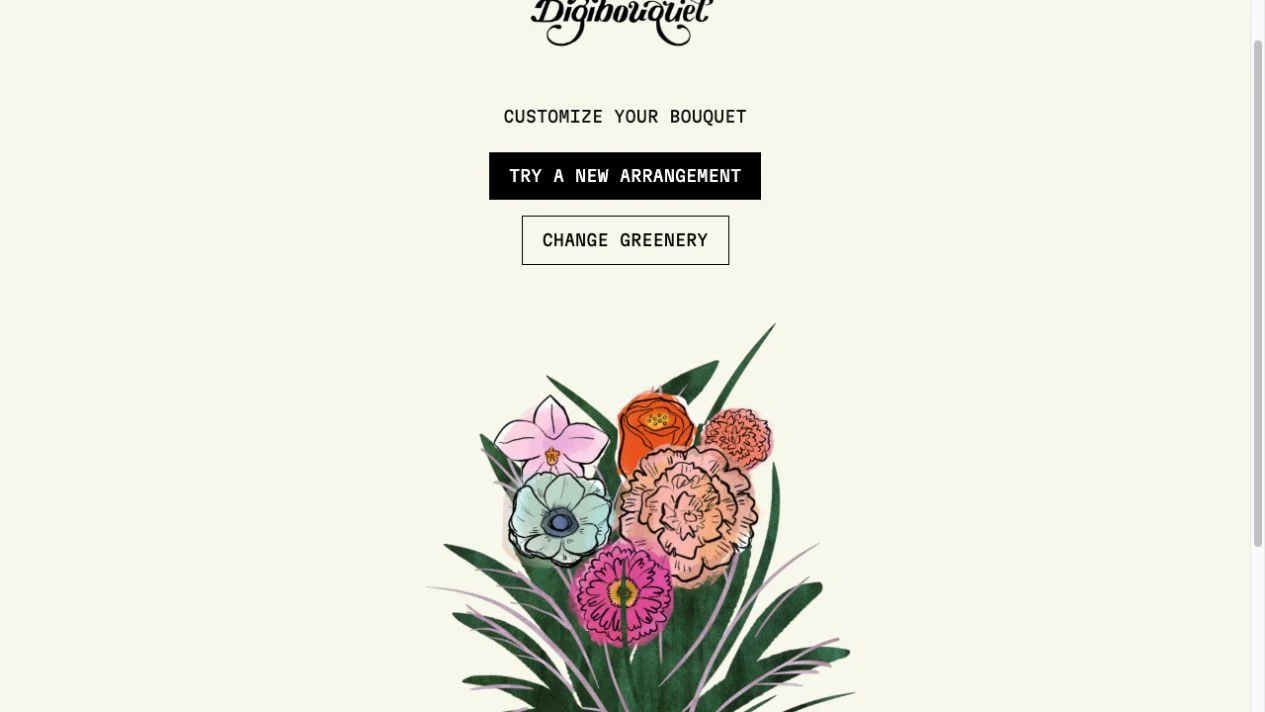
The customization screen offers Try a new arrangement and Change greenery. We used both controls and reached the card-writing stage afterward. These controls make composition a quick sequence of variations, useful when you want a pleasing result without a complex drawing workspace. Inspect how large blooms overlap smaller ones and whether foliage helps the flowers read clearly. We did not verify manual dragging, individual flower rotation, saved design versions or repeatable layout controls; the visible variation buttons should not be expanded into claims of a full design editor.
What happens when you write the card?
The next screen contains a recipient field introduced by Dear, a message area and a sender field introduced by Sincerely. That is the point to connect the visual gift to a particular occasion: a specific thank-you or shared memory usually gives the arrangement more meaning than a generic greeting. We stopped at this screen without entering personal information, creating a bouquet record or sending a link. The homepage describes browser-based delivery through a link, but recipient opening, final link creation and post-sharing editing were not tested in this check.
Are shared bouquets private, and what is the public garden?
The project’s privacy policy, dated August 25, 2025, says shared designs and card content are stored for link access. It states that anyone with a link can view a bouquet and that some bouquets may appear in the public garden. The policy also names analytics and advertising services. The garden provides examples of other arrangements; treat it as inspiration rather than proof that your own card will remain private. Read the current policy before writing a real greeting, and leave sensitive details out. We did not audit data handling or verify deletion and retention controls.
Is DigiBouquet free, and what if it does not work?
The privacy policy describes DigiBouquet as free and accountless. We encountered no sign-in or payment in the picker, arrangement and card-entry flow. If Next is unavailable at the flower stage, first check the displayed 6–10 bloom requirement. For a blank or incomplete illustration, allow assets to load and try a current browser before rebuilding the design. We did not test every device, verify final sharing availability or establish a long-term hosting commitment. Keep a separate draft of your message if you need to reload.
How does it compare with other creative Vercel apps?
DigiBouquet puts choosing blooms, foliage and a card in one short flow and offers a monochrome path from the homepage. Bloomify is another bouquet-focused project worth comparing through its own guide rather than assuming the two have identical controls or storage. Gacha Message emphasizes several short capsule reveals; Canned Letter centers on opening a single illustrated can. Choose the interaction that adds meaning to your recipient’s message. Hosting on Vercel is the discovery context, while the actual creative workflow is the more useful reason to pick a tool.
Who it suits
People making a flower-themed browser greeting and readers exploring small creative Vercel projects.
Before you start
The project says anyone with a bouquet link can view it, and some bouquets may appear in its public garden. Do not treat a shared card as confidential.
Common questions
What is the DigiBouquet Vercel app URL?
Open https://digibouquet.vercel.app/. The homepage identifies the project as DigiBouquet and credits @pauline_makes.
How many flowers can I put in a bouquet?
The inspected flower picker asks for 6–10 blooms. We selected six and advanced to customization.
Can I make a black-and-white bouquet?
Yes. The homepage has a separate black-and-white entry, which we opened and confirmed displays outlined flowers.
Can I change the arrangement and greenery?
The customization screen provides Try a new arrangement and Change greenery. We used both before reaching the card-writing screen.
Is DigiBouquet free and does it require an account?
The project’s privacy policy describes it as free and says no account is required. No sign-in or payment gate appeared in the editing steps we checked.
Can other people see my bouquet or card?
The privacy policy says anyone with the link can access a bouquet, and some bouquets may appear in the public garden. Avoid sensitive content and review the current policy before sharing.
Did AINavly test sending a bouquet?
No. We tested flower selection and customization, reached the card-entry screen and inspected the monochrome picker. We did not create or send a recipient link.
Does this service deliver real flowers?
The inspected product creates illustrated bouquets to open in a browser. We found no physical flower ordering or delivery workflow in the checked interface.
Sources and review scope
- Project website ↗
- Color-mode bouquet builder ↗
- Black-and-white bouquet builder ↗
- Project privacy policy ↗
- Public garden examples ↗
Checked October 18, 2026: opened the homepage, selected six color-mode flowers, advanced to customization, used the arrangement and greenery controls, and reached the blank card-entry screen. Also opened the monochrome picker and read the privacy policy and garden. No personal content was entered, no bouquet was published, and no share link was created or sent. Recipient access, editing after sharing, deletion, long-term retention and device compatibility were not tested.