What is Stitch Typewriter?
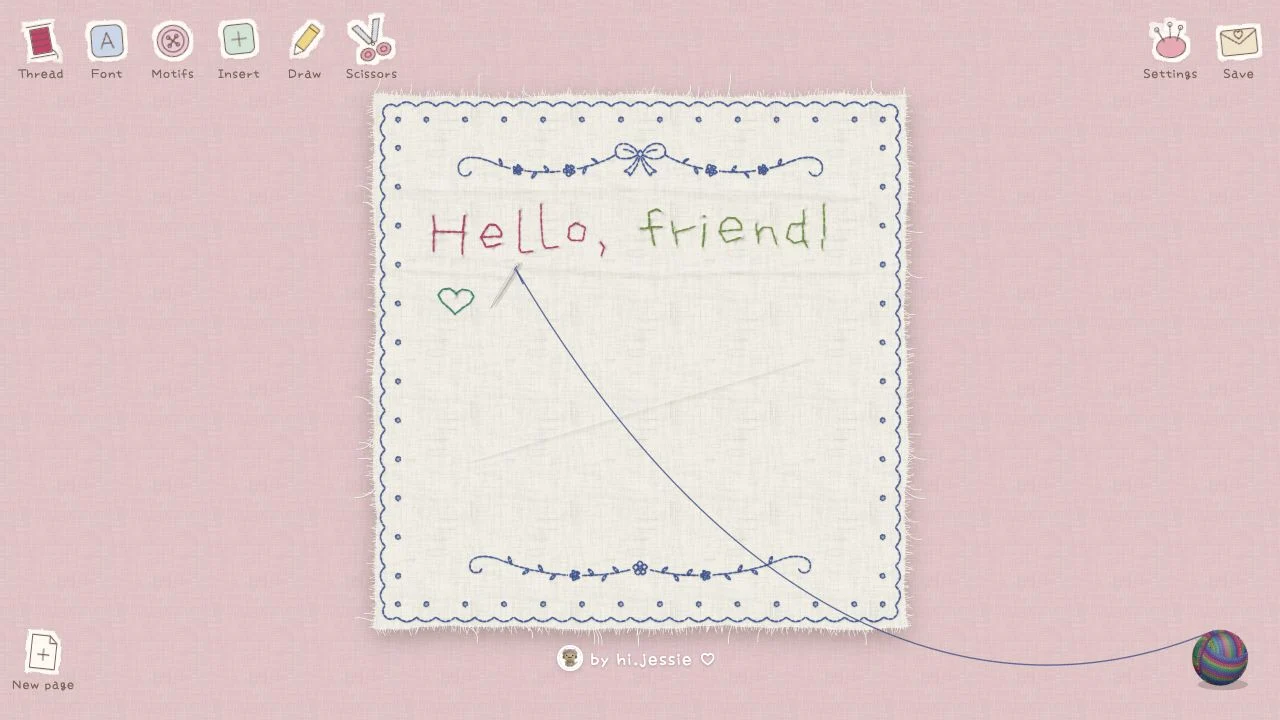
The site at ilovestitching.vercel.app is a small visual editor for stitched-looking text. Its current interface is Chinese and includes thread, font, motif, drawing, and save controls. It is useful for a decorative message or a digital keepsake when plain typography feels too flat.
What you can do
- Embroidery-style lettering
- Thread and font controls
- Motifs, drawing, and save menu
How to get started
- Type a short message in the editing area.
- Adjust the thread and font, then add a motif if it suits the message.
- Inspect the composition and available save format before exporting.
Planning a small stitched composition
Keep the message short enough to remain readable as an image. Choose the lettering and cloth treatment before filling the canvas with motifs. Review the exported result at the size you plan to share; small decorative stitches can compete with the words when the image is reduced.
Start with a small design
Check a few characters before laying out a long message. Letter shapes and spacing matter more at the final output size than they do in a zoomed-in editor.
Who it suits
People designing a stitched message or decorative image.
Before you start
An embroidery-style image is different from a machine-ready stitch file. Check the format offered by the save menu.
Common questions
Where is ilovestitching?
The editor is at ilovestitching.vercel.app. It is also known as Stitch Typewriter or the text embroidery tool.
Can I send the result straight to an embroidery machine?
Do not assume so. Check for an explicitly supported machine format; a picture of stitches is not a stitch program.
Sources and review scope
Current Chinese-language editing controls checked; export delivery not retested.