
What is ThinkOfYou?
Think of You Vercel app is the search phrase for ThinkOfYou at think-of-you.vercel.app. The project turns a photograph and a few personal words into a two-sided digital postcard, with a front for the picture and a back for the recipient, message and signature. AINavly covers it as a focused Vercel-hosted creative project: the familiar postcard structure gives a small greeting a visual setting without starting from a full design canvas. Our check used fictional text and stopped before photo upload or sharing.
What you can do
- Photo-upload area on the postcard front
- Optional front title with a 25-character counter
- White or black title-color choices
- Flip control between front and back editing
- Recipient and sender fields with 25-character counters
- A message area with a 180-character counter
- Three stamp and five flower-decoration choices
- A Share control, not activated in our text-only check
How to get started
- Open think-of-you.vercel.app and choose Create a postcard.
- On the front, inspect the photo-upload area and prepare a picture you are comfortable sharing.
- Optionally add a short title and choose white or black lettering.
- Use Click to flip to edit the postcard back.
- Enter the recipient, your displayed sender name and a brief message, checking the visible counters.
- Choose a stamp and flower, then flip between the two sides to review the design.
- Follow the current validation and sharing steps only when the postcard is ready; we did not upload a photo or create a share link.
Where is the Think of You Vercel app website?
The project covered here is https://think-of-you.vercel.app/, and its displayed name is ThinkOfYou. The homepage leads to a Create a postcard editor at /create and credits @iryna_lupan. Use the full hostname when looking for this specific creative app rather than relying on its common phrase alone. The footer also credits Cursor as a development tool; that is not evidence that the postcard editor generates text or images with AI. AINavly is an independent directory, not the operator of this service.
How do the front and back work together?
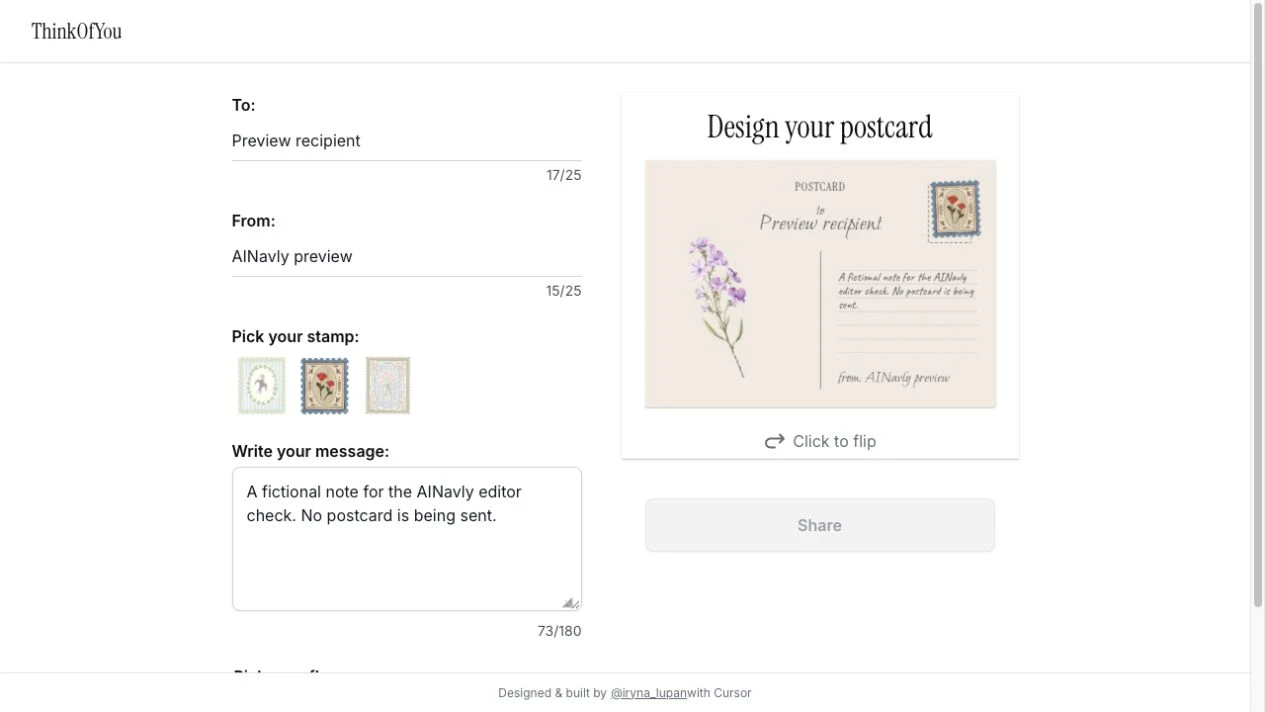
The front has an image-upload area, an optional title field and white/black title-color choices. After flipping, the editing panel changes to the recipient, sender and message fields, alongside stamp and flower choices. This is a compact two-sided format: let the photograph establish a place or mood, then use the back to say why it matters. We entered A small hello as a sample title, selected black lettering and flipped the card. We did not upload a photograph, so image handling, cropping and the finished photo presentation remain untested.
What are the visible text limits?
The front title shows a 25-character counter and is explicitly labeled optional. On the back, both To and From display 25-character counters, while the message counter ends at 180. These visible limits favor a concise greeting over a long letter. Draft one complete thought, keep the recipient name easy to read and use a sender name the recipient recognizes. We inspected the counters with short fictional values; we did not test truncation, every writing system or how combined emoji are counted.
What did the live editing test show?
We filled To with Preview recipient, From with AINavly preview and the message with an explicitly fictional editorial note. The postcard preview displayed those values on its back. Selecting the second stamp and second flower changed the checked selections, and the preview showed a floral stamp and a purple flower illustration. This confirms the text-and-decoration preview in the session we visited. It does not establish successful photo upload, link generation, delivery to another device or retention after a refresh.
Why might the Share button be unavailable?
Share stayed disabled during our text-only check, including after the recipient, sender and message were entered. The front still had no uploaded photo. That observation means entering text alone did not produce a share-ready card in our session; it does not prove that one missing image is the only possible validation condition. Complete the current visible form and inspect any validation message before retrying. We did not bypass the disabled control, upload a test photo or examine the final link-creation stage.
How should you choose the photo and wording?
Pick one image that gives the recipient a clear connection: a shared place, a small moment or something that reminded you of them. Use the optional title as a short caption rather than repeating the whole message. The title-color switch is worth checking against the actual image so the letters remain readable. Because a photo may include other people or identifying details, choose one you have permission to share. Keep your original photo and text separately; the editor is not a verified backup or archival system.
Is it free, and what happens to a shared postcard?
No sign-in or payment gate appeared on the homepage or in the text-editing path we inspected. We did not establish a complete pricing policy or test the Share action. Private access, link expiration, editing after sharing, deletion and long-term hosting were not verified. Read any current information presented at the sharing stage before including sensitive content. For an important occasion, check the recipient experience yourself once the app produces a link rather than assuming a local preview guarantees delivery.
How does ThinkOfYou differ from other small gift apps?
ThinkOfYou centers on a photograph with a compact postcard back. Canned Letter is a closer fit for a longer note inside an illustrated can; DigiBouquet begins with arranging flowers and a card; tiny internet package combines several handmade-looking gift editors. Choose ThinkOfYou when a single picture and a short message carry the gesture. In a Vercel discovery directory, that narrow editing model is more useful to understand than treating every digital greeting as the same product.
Who it suits
People creating a photo-centered greeting and readers exploring compact creative Vercel projects.
Before you start
Keep the original photo and message separately. Share-link creation, recipient access, editing after sharing and retention were not verified.
Common questions
What is the Think of You Vercel app URL?
Use https://think-of-you.vercel.app/. The site displays the name ThinkOfYou and links to its postcard editor at /create.
Can I put my own photo on the postcard?
The front of the editor offers click-to-upload and drag-and-drop photo input. We inspected the control but did not upload a photo or verify file requirements.
Does the front need a title?
The title field is labeled optional and shows a 25-character counter. The editor also offers white and black title colors.
How long can the message and names be?
The inspected counters show 25 characters for To, 25 for From and 180 for the message. We did not test how every input type is counted.
How do I edit the back of the postcard?
Use Click to flip or the postcard flip control. The editing panel changes to recipient, sender, stamp, message and flower controls.
Why is Share greyed out?
Share remained disabled in our text-only check while no photo had been uploaded. Follow the current form requirements and validation; we did not verify the complete set of sharing conditions.
Did AINavly test sending a postcard?
No. We edited fictional text, chose decorations and inspected the back preview. No photo was uploaded, no link was generated and nothing was sent.
Is the postcard link private or permanent?
We did not verify link access controls, expiration, deletion or long-term availability. Review the current sharing information and keep your own copy of the photo and message.
Sources and review scope
Checked October 18, 2026: opened the homepage and /create, entered a sample front title, selected black title color, flipped to the back, entered fictional recipient/sender/message values and selected the second stamp and flower. Observed the back preview and disabled Share control. No upload, share-link creation, message delivery, payment, reload persistence, file-format, cross-device or privacy test.

