

What is tiny internet package?
A Little Love for You Vercel app is the search phrase for alittleloveforyou.vercel.app, which currently presents itself as tiny internet package. It is a browser-based virtual gift maker: compose a letter, draw a sticker, arrange a short tune, assemble a digital keychain or work on a cross-stitch motif, then prepare those pieces as a small parcel. AINavly’s Vercel project coverage follows the current interface and the draft we actually tested, including what happens before the separate sealing and sending stages.
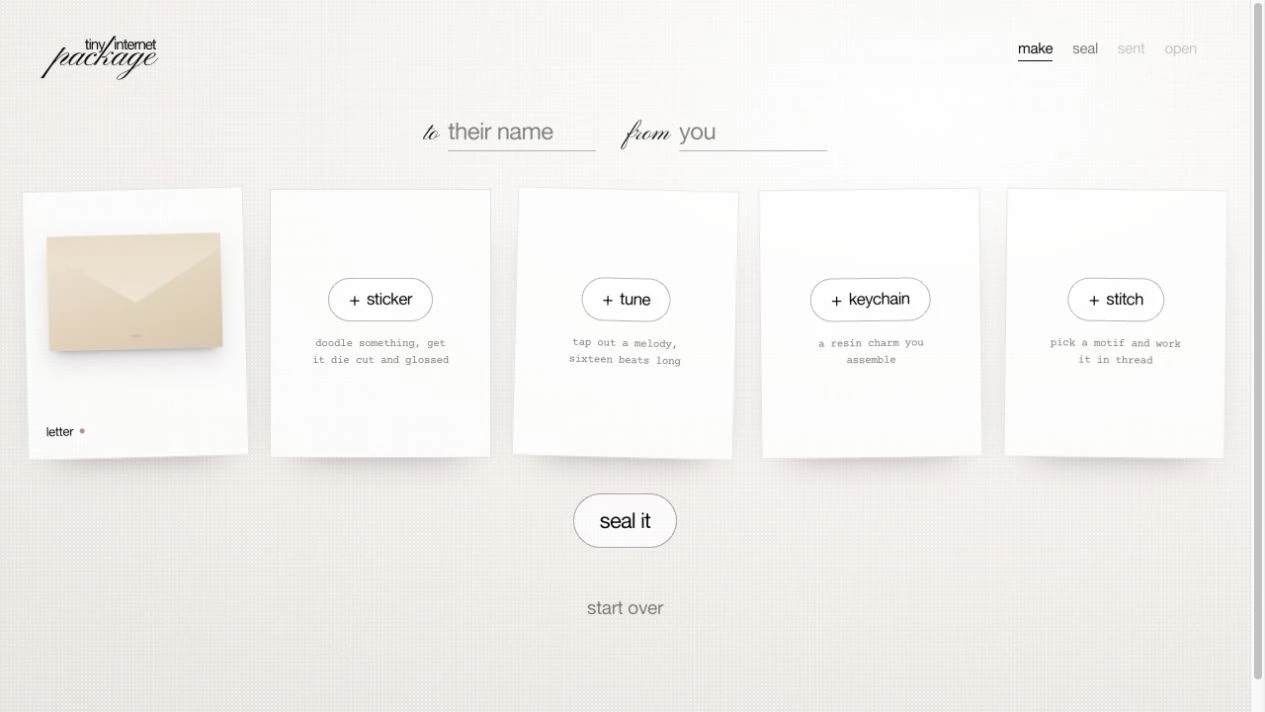
What you can do
- Five gift editors: letter, sticker, tune, keychain and stitch
- A letter editor with five envelope-stock choices
- Sticker drawing controls with colors and nib sizes
- A sixteen-beat tune grid with note and hold rows
- Digital keychain shape, resin and filling choices
- Cross-stitch motifs, thread colors and a freestyle option
- A draft overview showing which gifts have been made
How to get started
- Open alittleloveforyou.vercel.app and choose make your gift box.
- Inspect the recipient and sender fields and the five gift choices.
- For a simple first trial, open letter and write a short, non-sensitive sample.
- Choose an envelope stock, then use into the packet to return to the draft.
- Check that the letter is marked made before exploring another editor.
- Review your content and the current sealing flow before making a real gift. We did not seal or send a parcel in this check.
Why does A Little Love for You show tiny internet package?
The supplied hostname is alittleloveforyou.vercel.app, while the page title and visible wordmark currently say tiny internet package. Our guide keeps the search phrase in its title so readers can locate the exact address, and uses the displayed product name to explain what loads there. The homepage credits @pattyteaa. This check does not establish a rename date, launch history or a move from another domain. AINavly is an independent directory and does not operate the gift service.
What is the idea behind the virtual gift box?
The maker organizes the task around making several small objects rather than filling in one generic greeting template. Its five tiles lead to different creative actions, with a made or not-made state on the draft overview. That makes it possible to build the gesture around your own effort: a few handwritten-looking lines, a small drawing or a simple melody. The interface describes digital gifts; we found no physical shipping workflow in the checked path. Start with one piece that matters to the recipient instead of treating completion of every tile as the goal.
What did the letter test show?
We entered a clearly fictional editorial greeting, selected the third envelope stock and used into the packet. The draft then showed the letter as made, and the Seal it control became available even though the other four gifts were still unmade. Reopening the letter restored our sample text and stock choice. This confirms the draft interaction within that session; it does not establish reload recovery or editing after a gift is sent. The editor also instructs users to click the envelope to open or shut it. We did not test every envelope interaction.
How do the sticker and keychain editors differ?
The sticker screen provides a drawing area, eight color choices, three nib choices and an Undo control. Its next action is labeled Peel it off, with instructions describing a later cutting and finishing step. We inspected the entry screen without drawing or completing that later stage. The keychain editor instead offers oval or rectangle shapes, clear/blush/rose/smoke resin choices, stars or hearts as filling, and a foil-press action. We opened these controls but did not complete a charm. These are two distinct creative flows, not interchangeable image-upload fields.
What can you do with the tune and cross-stitch tools?
The tune editor shows sixteen beats, with A, G, E, D and C note rows plus a hold row. It offers four starting patterns and a playback control. We read the grid but did not verify audio output. Cross stitch offers thread colors, flower, bow, flower-field and star motifs, plus freestyle. Its instructions ask users to fill marked holes and describe unpicking a stitch or a row. We did not finish a motif or test the input gestures. Choose the medium around the message you want to give, rather than assuming each editor is a full music or illustration application.
How far did AINavly test sealing and sending?
Our check stopped in the draft-making stage. The top navigation displays make, seal, sent and open, and Seal it became enabled after our letter was added. We did not seal a parcel, create a recipient link or send anything. Those later labels describe the intended flow, not proof of delivery or a tested recipient experience. Before relying on a gift for an occasion, inspect the current steps and confirm what can be reviewed or changed. We did not establish expiration, revocation, deletion, private access or the ability to edit a shared parcel.
Is the app free, and what if a gift editor does not respond?
No login or payment gate appeared in the homepage, maker or editor-entry screens we checked. That is an observation of those steps, not a complete pricing policy. If the maker shows an opening transition, let it finish before choosing a gift. For an unavailable action, check whether the current editor needs content: our empty letter could not be placed into the packet until we entered text. Keep your message separately before a refresh. We did not test draft persistence across reloads, every browser, mobile drawing, melody playback or shared-link reliability.
How does it compare with other small gift-making projects?
tiny internet package combines several handmade-looking media in a single draft overview. Canned Letter focuses on a letter presented as one illustrated can, Gacha Message places short notes into capsule reveals, and DigiBouquet starts with flowers and a card. This project is worth exploring when choosing or making the little objects is part of the gesture. A modest letter may be enough; adding a tune or stitch should make the gift more personal rather than merely longer to assemble. The Vercel hostname identifies the project, while the making process explains its appeal.
Who it suits
People making a thoughtful virtual gift and readers exploring small interactive Vercel projects.
Before you start
Keep an original copy of important text. Link access, retention, post-sharing edits and the final recipient experience were not verified.
Common questions
What is the A Little Love for You Vercel app URL?
Open https://alittleloveforyou.vercel.app/. In our check it displayed the product name tiny internet package.
What can I put in the virtual gift box?
The maker offers letter, sticker, tune, keychain and stitch editors. We completed a sample letter in the draft and inspected the other four editor entry screens.
Do I need to make all five gifts?
In our checked draft, adding a letter alone enabled Seal it while the other four tiles remained unmade. We did not finish sealing or verify later requirements.
Can I choose the envelope?
The letter editor displayed five envelope-stock choices. We selected the third and saw that choice retained when reopening the letter in the same session.
How long is the tune?
The tune interface describes sixteen beats with one note per beat and a hold option. Playback and the recipient’s audio experience were not tested.
Are the keychain and sticker physical products?
They are presented as creative pieces inside a virtual gift maker. We found no physical ordering or shipping flow in the checked screens.
Did AINavly send a gift or test a recipient link?
No. We made a fictional letter draft and inspected editors. We did not seal the parcel, generate a recipient link or send a message.
Can a sent parcel be edited or kept private?
We did not verify post-sharing edits, deletion, retention or access restrictions. Review the current sharing flow before including personal content.
Sources and review scope
Checked October 18, 2026: opened the homepage and /make, entered a fictional editorial note in the letter editor, chose envelope stock 3, saved it into the draft and reopened it. Inspected the sticker, tune, keychain and stitch editor entry screens without completing those gifts. No personal recipient or sender names, audio playback, finished drawing/stitch, sealing, share-link creation, sending, payment, reload persistence or recipient-device test.