
Bali Fuel Watch: The Vercel App, Explained
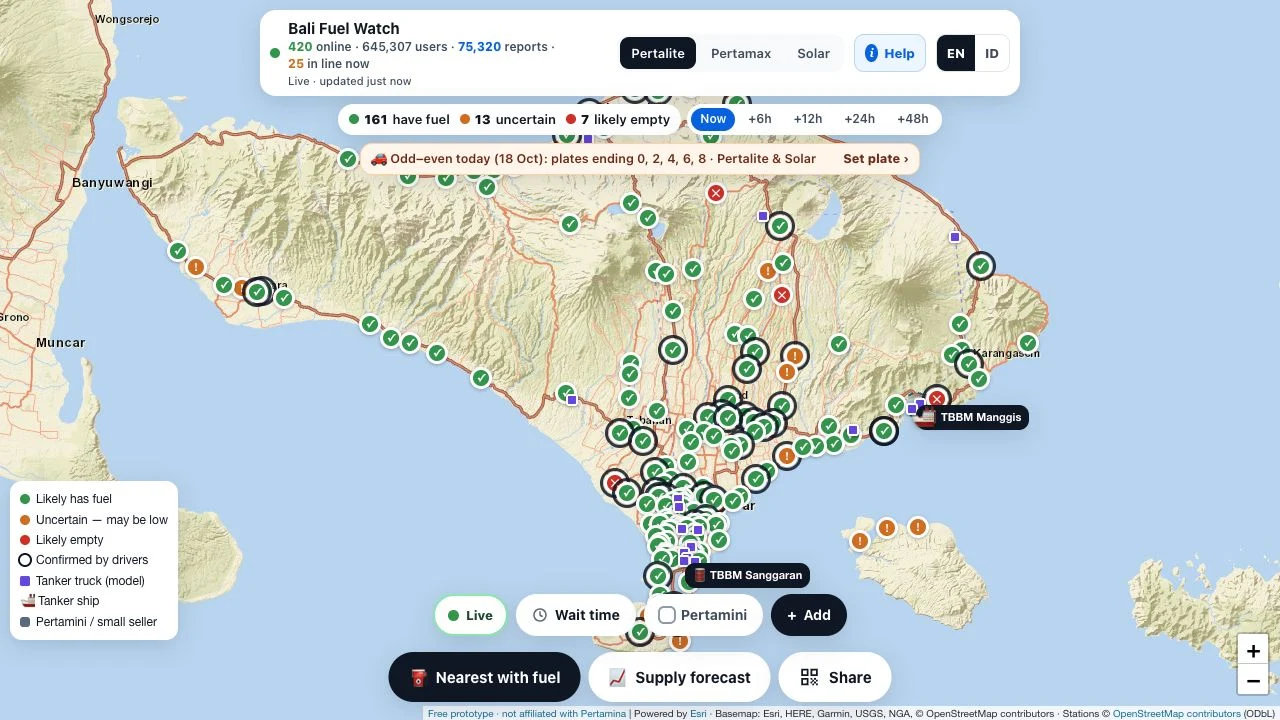
Bali Fuel Watch is a focused Vercel-hosted web app built around one local problem: understanding where fuel may be available in Bali. Instead of a long onboarding flow, the inspected page opens onto a map with fuel selectors, status markers and a language switch. This guide explains the product you will find at that address and how to interpret its interface.
Open Bali Fuel Watch ↗- Project website
- balifuelwatch.vercel.app
- Access
- Free prototype
- Account
- Not needed for public viewing
- Region
- Bali, Indonesia
- App languages
- English / Bahasa Indonesia
- Affiliation
- Independent; not a Pertamina service
Independent guide. AINavly does not operate Bali Fuel Watch or verify its live fuel estimates.
Where is the Bali Fuel Watch Vercel app?
Use balifuelwatch.vercel.app to find the project described here. The visible product name is Bali Fuel Watch. “Vercel” identifies its hosting address; it does not indicate a Pertamina partnership, a government service or independent verification of its data.
This is a browser experience. We did not encounter an installation requirement, login wall or payment gate when opening its public map. An optional location feature is a separate interaction from simply viewing the page.
What does the homepage let you explore?
The top controls offer Pertalite, Pertamax and Solar. A separate EN/ID switch changes key interface labels; in Indonesian, examples include Kini, Waktu tunggu and Prakiraan pasokan. Fuel selection and language selection solve different problems and should not be confused.
The map includes station markers and a legend, while separate controls expose future time horizons, nearby-station discovery and wait-time filtering. Some labels remained in English during our Indonesian-interface check, so the presence of ID should not be read as proof that every panel is fully translated.
How to try the app without sending a report
- Open the Vercel address and dismiss introductory panels if needed.
- Choose a language, then select the fuel category you want to inspect.
- Read the legend before interpreting station colors or symbols.
- Inspect a station and distinguish a recent driver report from an estimate.
- Compare Now with a future horizon only as a way to understand the interface; do not treat the forecast as verified stock.
What powers the information shown?
The app attributes station and seller locations to OpenStreetMap and displays map-provider credits. Its help distinguishes driver contributions from model-generated estimates. These are different layers: a station location can be correct while a fuel-status estimate is wrong.
Large user and report counters were displayed, but we did not verify them independently. They are not evidence of prediction accuracy, official adoption, or universal station coverage.
Why does the prototype label matter?
Bali Fuel Watch calls itself a free prototype and says it has no Pertamina or government affiliation. For a directory reader, that is useful product context: the page offers an interface to investigate, rather than a service-level promise about live fuel inventory.
The creator is not identified here because we did not verify an individual or organization behind the project. Avoid inferring ownership from the deployment platform, a map provider’s attribution or a brand mentioned in station labels.
What should you know before using location or reports?
Help text describes a GPS check for the queue workflow and says reports are anonymous. Those are project statements, not findings from an independent privacy audit. Reading the map does not require you to test every contribution feature.
If you later use a location or reporting action, read its current explanation first. Only report conditions you actually observe; do not post a speculative shortage to experiment with the interface.
What if the Vercel page is not working?
Check that you are opening the full project hostname. If the shell appears but the map does not, distinguish map-tile or data loading from a missing website. A reload and another current browser can help identify a local loading issue.
A blocked permission can affect a location action even while the public map works. If the app remains unavailable, consult the station or official operator rather than assuming its previous status is still current.
Frequently asked questions
What is Bali Fuel Watch?
It is an independent, Bali-focused fuel-map prototype at balifuelwatch.vercel.app.
Do I need to install an app?
The public map opened in a browser in our check. We did not need an installation to inspect it.
Does the Vercel address mean it is official?
No. Hosting is separate from operator affiliation; the app disclaims a connection to Pertamina and government authorities.
Is the interface available in Indonesian?
Yes. An ID switch changes key interface labels. Some help and map labels remained in English during inspection.
Are the future fuel views guaranteed?
No. They are estimates and should not be treated as guaranteed inventory or replenishment schedules.
Did AINavly verify the displayed fuel supply?
No. We inspected the interface and its explanations, not station stock or prediction accuracy.
Sources and check scope
Our October 18, 2026 check covered the public homepage, English-to-Indonesian switch, visible map controls and the app’s help/disclaimer. We did not test geolocation, contributions, routing accuracy, reported stock, queue measurements or prediction quality.