
Gesture Synth Weld Vercel App: Website & How to Play
Gesture Synth Weld Vercel app is the Gesture Synth browser instrument at gesture-synth-weld.vercel.app. It is designed to turn hand movements into chords and musical expression, with a choice of keys and five visible tones. Start with the camera requirement and the project’s gesture guide, then work through one musical control at a time.
Open Gesture Synth ↗- Project website
- gesture-synth-weld.vercel.app
- Displayed product name
- Gesture Synth
- Creator credit
- Eric Wei; @indecisive.eric in the interface
- Main use
- Gesture-controlled browser music
- Playing requirement
- Camera access is required, according to the entry screen
- Access checked
- Public entry visible without login or payment
- Last checked
- October 18, 2026
Independent guide. AINavly does not operate Gesture Synth; no camera-enabled playing session was tested.
What is the Gesture Synth Weld Vercel app?
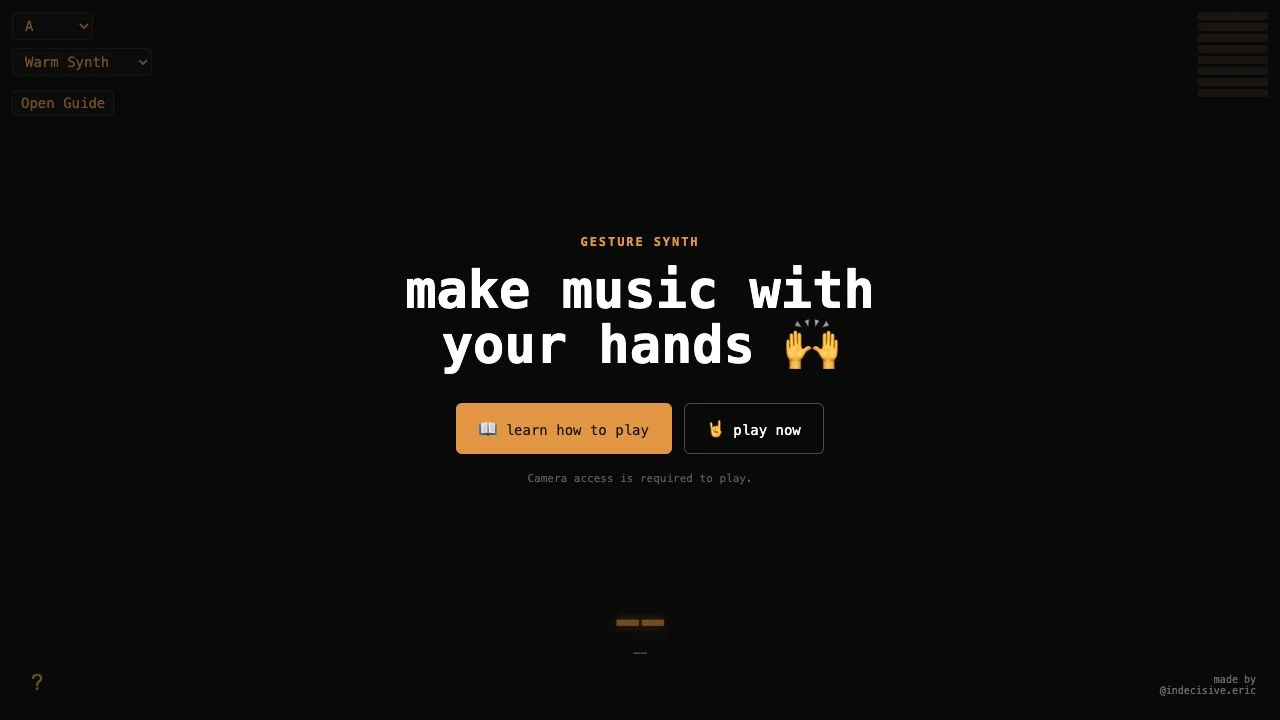
Open https://gesture-synth-weld.vercel.app/ to find this specific project. The interface uses the name Gesture Synth; the search phrase combines that name with its Vercel deployment hostname. The entry provides learning and playing actions, while the instrument controls sit around the main stage.
The interface credits @indecisive.eric, and its delivered guide names Eric Wei and links to his website. AINavly is an independent directory rather than the developer. The Vercel address identifies the deployment we inspected; it does not by itself establish the framework, privacy model or music-production integrations.
What can you explore before enabling the camera?
The visible key selector includes the twelve chromatic key choices, with A selected on our visit. The tone list showed Warm Synth, Bright Synth, Retro Synth, Strings and Horns. Choose one tone for the first exercise so that a change in gesture is easier to distinguish from a change in sound setting.
The entry offers Learn how to play and Play now, and explicitly says playing requires camera access. You can read this overview before deciding whether to start that camera-dependent experience. No account or payment gate appeared on the public entry we viewed, but we did not verify every later feature or a complete pricing policy.
How to use Gesture Synth: a first-session checklist
- Open the exact gesture-synth-weld.vercel.app address in the browser you intend to use.
- Read the learning material and decide whether the camera requirement is appropriate for your session.
- Choose a musical key and tone; begin with one sound rather than comparing every option at once.
- If you choose to proceed, use Play now and review the browser’s camera request. We did not perform this step in our check.
- Use the documented left-hand controls to explore a single chord change before combining both hands.
- Check your device volume and the page’s sound guidance if you cannot hear anything; stop and troubleshoot before assuming a gesture is wrong.
What does the guide say the left hand controls?
The guide text assigns chord character and scale degrees to the left hand: hand tilt changes major versus minor, and finger combinations select degrees I through VII. It also describes optional semitone changes using vertical position after enabling Raise or Lower.
Treat this as a learning map from the project, not a measured claim about recognition accuracy. Begin with one clearly separated gesture and compare it with the app’s feedback before attempting a longer sequence.
| Left-hand action described | Musical role in the guide |
|---|---|
| Inward or outward tilt | Major or minor chord character |
| Finger count or combinations | Scale degrees I–VII |
| Height with Raise or Lower enabled | A one-semitone pitch shift |
How do the second hand and playing modes fit in?
The delivered guide lists Two-Handed and Left Hand Only modes. In its two-handed explanation, right-hand finger choices affect chord voicing and seventh-chord options; thumb position changes octave, tilt changes filter amount, and height affects loudness. We did not test these mappings in a live camera session.
Learning each dimension separately is a more interpretable first exercise than moving both hands continuously. The presence of a left-hand-only mode is useful to investigate, but we cannot confirm its full behavior or claim accessibility across every input or device.
Why might Gesture Synth have no sound?
The page includes a sound notice advising users to check Silent Mode and device volume. Start with those visible instructions, then check the output device you actually intend to hear. A muted device, an incomplete playing session and an unrecognized hand are different possible causes.
We did not produce audio, so this is a troubleshooting checklist rather than a report that sound worked. Selecting Strings or Horns alone does not prove that a note has been triggered. Likewise, a page that loads is not proof that camera-driven interaction is running.
Is Gesture Synth safe, and what does camera access mean?
The entry’s camera requirement is explicit. Review the browser prompt and the project’s current explanation before enabling it, and use a setting where you are comfortable having the camera active. Our inspection did not establish whether video remains on-device, is uploaded, is retained, or is used for anything beyond playing.
We did not audit privacy or security and did not verify the underlying tracking technology. Do not infer local-only processing from a browser interface or attach a specific AI-library claim to this project without evidence. Camera use, audio output and account access should be evaluated as separate questions.
What if the app or tutorial is not working?
In our browser, the Learn how to play action did not expand the tutorial, even after one reload. That is a bounded observation of this environment, not evidence of a worldwide outage. The guide text was present in the HTML delivered by the project, which is the basis for the documented mappings above.
If the interface appears but an action does not respond, distinguish initial page loading from interactive controls. Try a current browser, inspect any on-screen error and verify permissions if you have chosen to play. A blocked camera or an unavailable device needs a different fix from low audio volume. We did not establish a supported browser or phone list.
When is this the right music tool to explore?
Gesture Synth is a relevant discovery when you want to explore a physical way of shaping harmony and sound. The combination of finger choices, tilt and height gives the learning process several dimensions. Begin with a small exercise and decide whether that interaction fits your musical interests and setup.
For listening-oriented experiences in this directory, Radio Musicologos offers a player interface and Mixtape for You centers a gift around linked songs. Neither is a replacement hand-tracking instrument. If you need reliable keyboard entry, recording, MIDI or export, choose a tool that explicitly documents those capabilities; we did not verify them here.
Frequently asked questions
Where is the Gesture Synth Weld Vercel app website?
The project covered here is https://gesture-synth-weld.vercel.app/. Its displayed product name is Gesture Synth.
Who created Gesture Synth?
The project’s delivered guide credits Eric Wei and links to indecisiveeric.com; the visible interface links to @indecisive.eric.
Does Gesture Synth need a camera?
The entry screen says camera access is required to play. We did not grant camera permission or test recognition.
What tones were visible?
Warm Synth, Bright Synth, Retro Synth, Strings and Horns were listed in the inspected selector. Their audio output was not tested.
Can it be played with one hand?
The guide lists a Left Hand Only mode alongside Two-Handed. We did not verify that mode in a playing session.
Is Gesture Synth free and does it require login?
The public entry opened without login or payment in our check. We did not verify later access conditions or a complete pricing policy.
Does the app keep camera footage on my device?
We did not establish video-processing location or retention. A browser-based instrument is not, by itself, evidence of local-only processing.
Can I record or export the music?
We did not verify recording, download, MIDI or export functionality. Do not plan a production workflow around those capabilities without checking the current project.
Sources and check scope
Checked October 18, 2026: opened the public entry screen, inspected the visible key and tone options, and read the guide text included in the project’s delivered HTML. The learn-how-to-play button did not expand the tutorial in our browser, including after one reload. We did not choose Play now, grant camera access, test hand recognition, produce or record sound, or verify performance, camera-data handling or device compatibility.