
What is Tiktokenizer?
Tiktokenizer Vercel app is the browser playground at tiktokenizer.vercel.app for exploring how text becomes tokens. Pick an encoding or model, enter a sample, and inspect the total, colored token boundaries and numeric token IDs. Its chat-model view also exposes message roles and a serialized template, which helps explain why a chat prompt can count differently from the same sentence alone. AINavly covers it as a Vercel-hosted developer utility, with concrete interface checks rather than a claim that every displayed total is a production usage bill.
What you can do
- Model and encoding selector, including cl100k_base and o200k_base
- Plain-text token counting with colored token boundaries
- Numeric token IDs for the displayed sequence
- Show whitespace option for inspecting spaces
- Chat-model message rows with roles and Add message
- Serialized chat text alongside the visual breakdown
- A public source repository linked from the application
How to get started
- Open tiktokenizer.vercel.app and wait for the selected tokenizer to initialize.
- Choose an encoding such as cl100k_base for a plain-text experiment.
- Enter a small public sample, for example Hello world!, and inspect its count and IDs.
- Enable Show whitespace to make spaces easier to see.
- Switch to a chat model only when you want to inspect messages and template overhead.
- Keep the system message, roles and formatting fixed when comparing alternative prompts.
- For a real deployment, verify usage against the exact production model and request format rather than treating this preview as a billing guarantee.
Where is the Tiktokenizer Vercel app?
Open https://tiktokenizer.vercel.app/ for the application covered here. The interface credits dqbd and links to github.com/dqbd/tiktokenizer. The project describes itself as a playground for openai/tiktoken; its selector also exposes additional model families. It is an independent utility, not a model-provider account portal or an interface for receiving a generated answer. The Vercel hostname identifies this hosted playground. AINavly does not operate it or guarantee that its model menu represents every currently available production model.
What did the plain-text test produce?
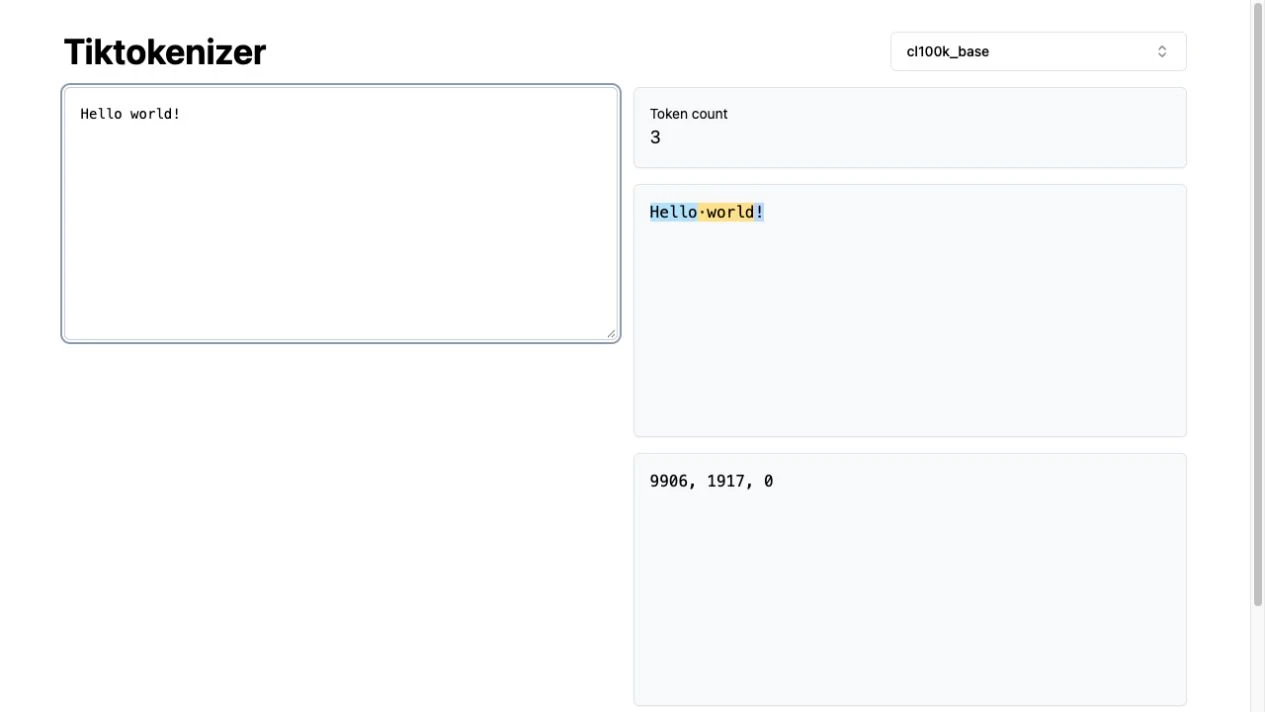
We selected cl100k_base and entered Hello world! as plain text. The page showed three tokens with IDs 9906, 1917 and 0. The colored pieces separated Hello, the space-prefixed world and the exclamation mark. Enabling Show whitespace made the space visible in that breakdown. These values describe this exact text and encoding in our October 19, 2026 check. Changing case, punctuation, spacing or the tokenizer is a different experiment; a word count or character count is not a substitute for inspecting the selected tokenization.
Why did the chat-model example show 19 tokens?
In the gpt-4o chat view, we kept the default system instruction, entered Hello world! as the user message and left the displayed template intact. The page showed 19 tokens and included role and boundary markers in its serialized input. Our loaded blank-user baseline had shown 16. The extra structure explains why that total should not be compared with three plain-text tokens as if they counted the same input. This is an observation of the playground’s template, not an independent test of how a production API serializes or bills the request.
How should you choose a model or encoding?
Use an encoding entry when your question is how a raw string is segmented. Use a model entry when you want to examine the app’s corresponding chat formatting and message roles. We inspected options including cl100k_base, o200k_base, gpt-4o and examples from open-source model families, but tested counts only in the two configurations described above. A name appearing in a selector is not proof that its underlying model endpoint is available or that every tokenizer path loads successfully. The upstream tiktoken project documents the distinction between selecting an encoding and resolving one for a model.
What do token colors, IDs and whitespace tell you?
The colors mark token boundaries so you can spot where a space, suffix or punctuation changes a split. The numeric list represents the encoded token sequence; those IDs are meaningful within the chosen tokenizer and should not be compared across different vocabularies as universal labels. The upstream tiktoken documentation explains tokenization as a reversible conversion between text and token IDs. Whitespace display is useful when two samples look identical but contain different spaces or line breaks. Use a small controlled example before pasting a whole prompt you cannot easily compare.
Can it predict API cost or context capacity exactly?
Treat it as a way to inspect input structure, not a complete cost calculator. A real request may include system instructions, conversation history, tool definitions or other content beyond the sentence you entered, and output usage is a separate consideration. A tokenizer preview also does not establish a model’s current context limit or price. We did not call a model API, generate a response or compare the playground total with a provider usage report. For a production decision, use the exact request format and the provider’s current model documentation and reported usage.
What if the result stays empty or a count looks wrong?
Allow the selected encoder to initialize before recording a result; our first loading snapshot briefly showed zero before the template count appeared. Then confirm the selected mode, exact text, whitespace and whether chat messages are included. A raw encoding and a formatted chat view can legitimately display different totals. If a particular model fails to load, isolate it with a small sample rather than assuming every option shares the same failure. We did not exhaustively test the model list, offline use, long inputs or every browser.
What should you know about access and source code?
The checked counting flow required no sign-in, API key or payment. The linked public repository provides a way to inspect the implementation and license for your own use; we did not install or self-host it. Avoid entering secrets or confidential prompts based solely on the absence of a login screen, since this check was not a privacy or network audit. Tiktokenizer is useful alongside a coding environment or model repository: it answers a narrower question about token structure, rather than replacing an editor, model evaluation or production observability.
Who it suits
Developers and prompt authors investigating token boundaries, input formatting and prompt-size differences.
Before you start
Match the tokenizer and input format before comparing counts. Do not use a playground preview as a guarantee of pricing, context capacity or private handling of sensitive prompts.
Common questions
What is the Tiktokenizer Vercel app URL?
The hosted playground is https://tiktokenizer.vercel.app/. Its interface links to the dqbd/tiktokenizer source repository.
How many tokens is Hello world! in cl100k_base?
In our October 19, 2026 plain-text check it was three tokens, with IDs 9906, 1917 and 0.
Why is the chat count higher than the sentence count?
The chat view includes the playground’s message template, roles and other message text. With the default system instruction and Hello world! as the user message, our gpt-4o view showed 19 tokens.
Does Tiktokenizer generate an AI answer?
The checked interface visualizes tokenization and counts. We did not encounter or invoke a model-response generation action.
What does Show whitespace do?
It makes spaces visible in the colored token display, which helps compare otherwise similar-looking inputs.
Are its counts guaranteed to match a production API bill?
No such guarantee was established. We tested the playground only, not production request serialization, model output or a provider usage report.
Can I use it without an API key?
Our plain-text and chat-template counting checks required no API key, account or payment.
Does every model in the menu work?
We inspected the selector but did not test every entry. Our verified examples used cl100k_base and the displayed gpt-4o chat template.
Sources and review scope
Checked October 19, 2026: inspected the model selector; entered Hello world! in the gpt-4o user-message row with the default system text, observed 19 tokens and enabled Show whitespace; switched to cl100k_base, entered the same raw string and observed 3 tokens with IDs 9906, 1917, 0. No model API request, billing comparison, exhaustive model test, installation or privacy audit.
